

Custom Settings
Custom Settings appear under the CUSTOM SETTINGS heading and are defined by the app developer (see Figure 12). Most Custom Settings have simple values such as strings, integers, floats, or booleans, but all are entered as text. For boolean type Custom Settings, type a valid boolean value such as True or False.
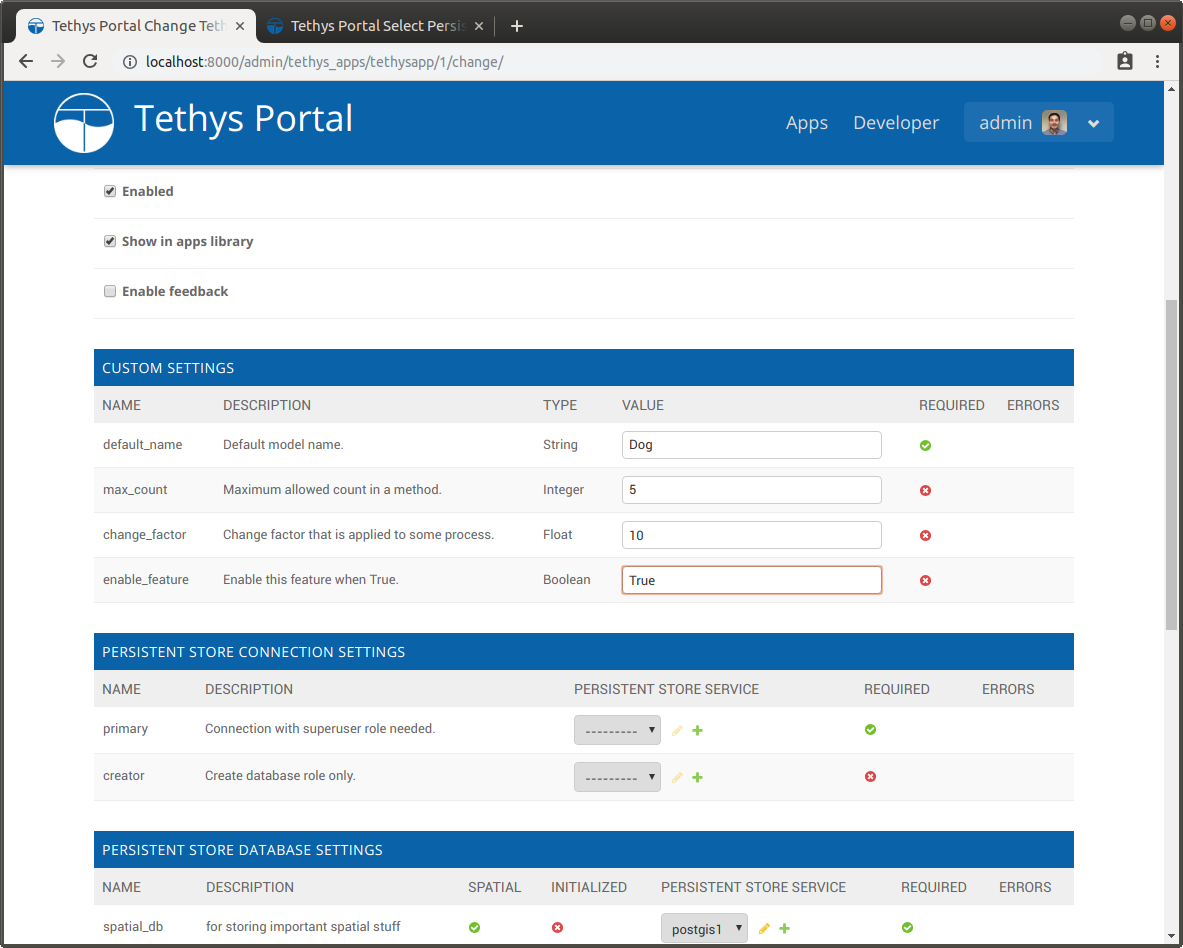
Figure 12. Custom Settings section of an app.
Secret Custom Settings
Secret Custom Settings can be used to store sensitive information that is need by your app such as passwords and API keys. The values of Secret Custom Settings are encrypted before being stored in the database and not displayed on the settings page for additional security. Secret Custom Setting values are returned as strings when you access them in your app.

Figure 13. Secret Custom Settings section of an app.
JSON Custom Settings
Important
This feature requires the django-json-widget library to be installed. Starting with Tethys 5.0 or if you are using micro-tethys-platform, you will need to install django-json-widget using conda or pip as follows:
# conda: conda-forge channel strongly recommended
conda install -c conda-forge django-json-widget

# pip
pip install django-json-widget
Don't Forget: If you end up using this feature in your app, add django-json-widget as a requirement to your install.yml.
JSON Custom Settings store JSON strings and provide an embedded JSON editor on the settings page for easy editing. In addition, you may initialize a JSON Custom Setting with a JSON file when installing an app.

Figure 14. JSON Custom Settings section of an app.