

Cookie Consent (Optional)
Important
This feature requires the django-cookie-consent library to be installed. Starting with Tethys 5.0 or if you are using micro-tethys-platform, you will need to install django-cookie-consent using conda or pip as follows:
# conda: conda-forge channel strongly recommended
conda install -c conda-forge django-cookie-consent

# pip
pip install django-cookie-consent
Tethys Portal includes the optional capability to provide transparency and opt-in consent to your users regarding the cookie usage of Tethys Portal and your installed applications. This capability is built on the Django Cookie Conset add-on for Django. This document describes how to configure cookie consent management in Tethys Portal.
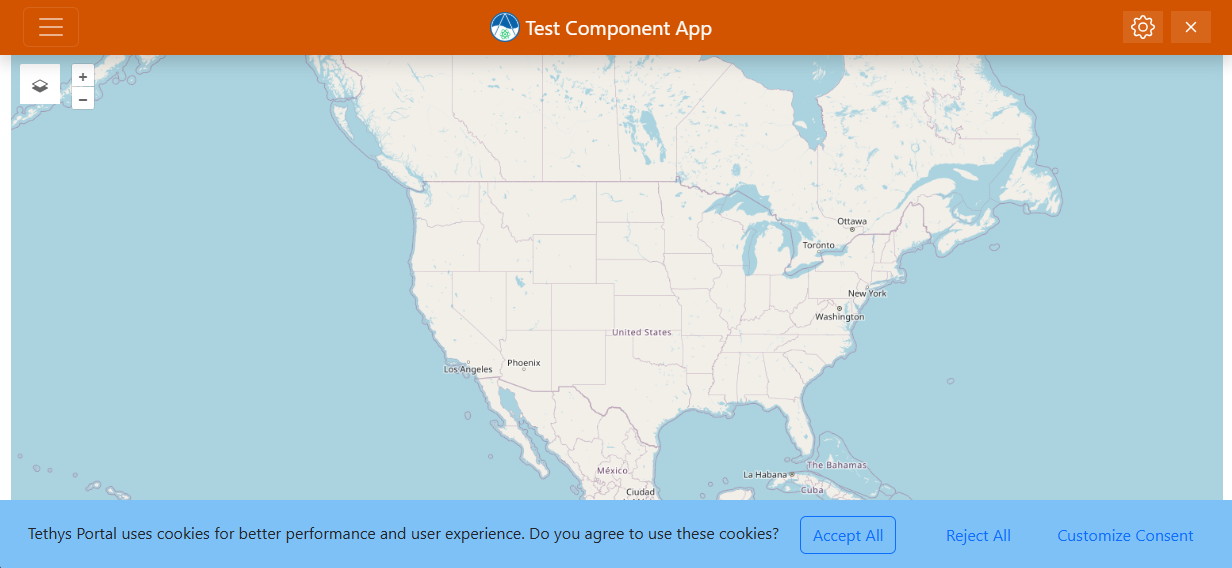
Cookie consent banner showing on bottom of screen when visiting an app
Cookie Categories
There are four main categories that cookie usage can fall under:
Necessary. These are essential for core functionality and cannot be opted out of. They are presented only for transparency.
Preferences. These cookies remember choices that users make (such as language or region) and provide enhanced, more personalized features. They can be opted out of.
Analytics. These cookies collect information about how visitors use the site, such as which pages are visited most often. They help improve the site and can be opted out of.
Marketing. These cookies are used to deliver advertisements more relevant to your users and their interests. They can be opted out of.
The cookies used natively by Tethys Portal are already configured out of the box to be presented for user consent. Tethys Applications, however, must explicitly declare the cookies they use so that Tethys Portal can read that info and pass it along to users for their consent.
Declaring Cookies Used By Apps
Cookies used by an app must be declared and documented in a cookies.yaml file that is stored in the app's Python package root's resources folder. You will need to create the folder as well if it does not already exist.
For example:
tethysapp-example-app  - App project root
└── tethysapp/example_app/ - Python package root
        └── resources/
            └── cookies.yaml
The structure of this file is described below.
YAML structure
The following top-level keys are supported in cookies.yaml:
necessarypreferencesanalyticsmarketing
These represent the four different categories that cookie usage can fall under, as described in the Cookie Consent (Optional) section above. Any top-level key not in this list will cause the loader to raise an error when synchronizing cookies with the portal.
Each category included must contain a mapping of cookie identifiers to cookie properties. The cookie identifier is used as the internal name for the cookie and should be unique within its category. The cookie propertis are as follows:
description— A short human-readable description of the cookie.path— The cookie path (e.g./).domain— The cookie domain (may be an empty string if not applicable).
Example
An example cookies.yaml that declares one analytics cookie and a couple of necessary cookies:
analytics:
  ga:
    description: "Google Analytics tracking cookie"
    path: "/"
    domain: "example.com"

necessary:
  sessionid:
    description: "Keeps the user logged in while navigating the site."
    path: "/"
    domain: ""

  csrftoken:
    description: "Prevents Cross-Site Request Forgery (CSRF) attacks."
    path: "/"
    domain: ""
Tips for developers
Keep cookie identifiers stable across releases so user consent remains associated with the same cookie.
Use clear, non-technical descriptions so users can make informed choices.
If your app stops using a cookie, remove it from
cookies.yaml— the synchronization process will remove it from the portal.
How synchronization works
When the portal synchronizes cookies for an app it:
Loads the
cookies.yamlfile from the appresourcesdirectory.Creates, updates, or deletes cookies in the database to reflect the YAML definition.
This synchronization runs at server startup, meaning that the server must be restarted to pick up changes to these cookies.yaml files.
Conditionally Using Cookies Based On Consent
While the cookies.yaml file is sufficient to document the cookies an app uses to users and allow them to accept or reject them, an app developer is still responsible for honoring the consent that users dictate.
Assuming that some users will reject some cookies, there must be logic built into the application to only use the cookies that have been accepted.
The following sections document how to dynamically check for a user's consent from within a Python request handler and an HTML template.
Checking for cookie consent in a Python request handler
To check from within a Python request function if consent has been given to use a non-essential category of cookies for an app (e.g. an app's "analytical" cookies), add the following:
from cookie_consent.util import get_cookie_value_from_request

def home(request):
    has_consent = get_cookie_value_from_request(request, "<app_package>__<cookie_category>")
    if has_consent:
        # add cookie
Where <app_package> is the common identifier used for your application (as defined in the app.py's App class), and <cookie_category> is one of: "analytics", "preferences", or "marketing" (whichever the cookie of interest belongs to).
Checking for cookie consent in an HTML template
To check from within an HTML template if consent has been given to use a non-essential category of cookies for an app (e.g. an app's "marketing" cookies), add the following:
{% load cookie_consent_tags %}
{% if request|cookie_group_accepted:"<app_package>__<cookie_category>" %}
{# load 3rd party analytics #}
{% endif %}
Where <app_package> is the common identifier used for your application (as defined in the app.py's App class), and <cookie_category> is one of: "analytics", "preferences", or "marketing" (whichever the cookie of interest belongs to).